
BLOG
What’s New in ITASCA Software v9.8
October 9, 2026
Explore MPoint and New Capabilities Across the Software Suite
ITASCA Software 9.8 is now available! This release introduces several significant additions, including our new MPoint program based on the Material Point Method (MPM), a Dynamic Damping Rapid Tool, axisymmetric fluid and thermal calculations, modal analysis capabilities, ability to export sections in 3D to a FLAC2D mesh or Sketch set, and numerous usability improvements.
Version 9.8 remains fully compatible with existing Version 9 projects, save files, examples, and data files. Users with an active subscription or maintenance plan can download, install, and start using these new features immediately.
Introducing MPoint: Large-Strain Modeling with the Material Point Method
The flagship feature of Version 9.8 is the official release of MPoint, the first commercial software using the Material Point Method (MPM) built specifically for large deformation geotechnical applications.
Traditional continuum approaches, such as finite difference or finite element methods, rely on a mesh that can become severely distorted during large-strain simulations such that solution calculations cannot continue.
MPoint addresses this challenge with a meshless approach. Instead of a deforming mesh, material points move through a background grid, allowing continuous simulation even with very large strains and deformations.
This capability opens the door to modeling problems that are difficult, or impossible, to solve using conventional meshed methods, including:
- Slope failures and runout analysis
- Tailings dam failures
- Static and dynamic liquefaction
- Landslides impacting infrastructure
- Post-failure deformation and consequences of failure
While discrete element methods (DEM), such as PFC, can also model large-deformation behavior, they often require significant computational resources and specialized calibration. MPoint retains the advantages of continuum modeling while enabling large-strain analysis through the MPM.
Compatible with FLAC2D and FLAC3D
MPoint can be used as a standalone 2D or 3D application, use FLAC meshes as scaffolding (converting all or some zones to material points), or coupled with FLAC2D and FLAC3D for improved computing performance. Coupling creates hybrid models that dynamically convert FLAC zones to material points during a simulation when large deformation occurs. This integration allows engineers to start with familiar models and modeling workflows while extending analyses past where traditional meshes would fail.
Real-World Applications
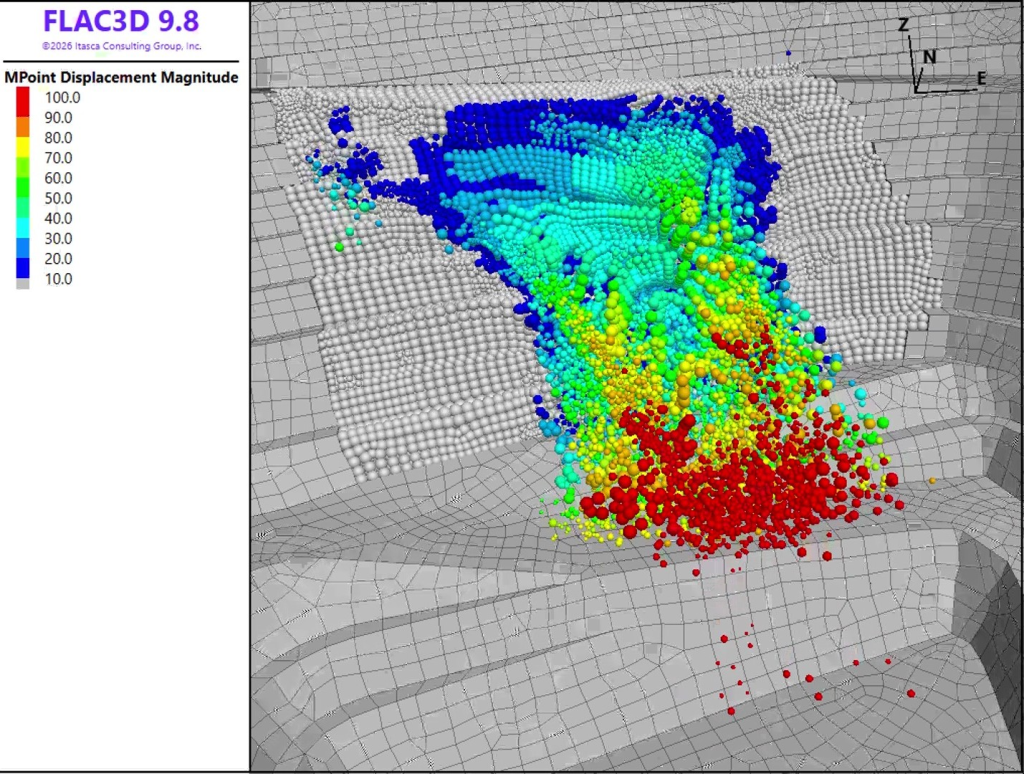
Open Pit Slope Failure: A coupled FLAC3D–MPoint3D model to evaluate potential wall collapse within an open pit mine. The simulation predicts both the failure mechanism and the runout extent, helping engineers understand whether displaced material might reach critical infrastructure at the pit bottom.
Automatic Zone Conversion: A simple slope model demonstrates dynamic conversion from FLAC3D zones to material points as deformation increases. This workflow enables simulations to continue seamlessly beyond the limits of conventional mesh-based calculations efficiently.

Dynamic Earthquake Analysis: A FLAC2D–MPoint2D model subjected to earthquake loading captures extensive shear band development and deformation levels exceeding those typically solvable with standard FLAC calculations alone.

Tailings Dam Liquefaction: Using the NorSand constitutive model for tailings material and the Mohr-Coulomb constitutive model for the starter dam and upstream dikes, MPoint2D simulates static liquefaction induced by a surcharge load and subsequent runout (along a horizontal wall element), providing valuable insight into failure progression and potential impact zones.

New Dynamic Damping Rapid Tool
Version 9.8 introduces a new Dynamic Damping Rapid Tool for FLAC2D, FLAC3D, 3DEC, and PFC that simplifies configuration of both Maxwell damping and Rayleigh damping.
For Maxwell damping, users specify the target damping ratio and lower and upper frequency limits. The tool then automatically calculates the component frequencies and amplitudes needed to achieve the desired damping response over the selected frequency range.
Similarly, the Rayleigh damping dialog calculates appropriate mass and stiffness damping coefficients based on user-defined damping targets and frequency limits.
Once configured, users can generate the corresponding commands directly for use in their models, eliminating much of the trial-and-error traditionally associated with damping calibration for dynamic simulations.

Axisymmetric Fluid and Thermal Analysis
FLAC2D has long supported axisymmetric mechanical calculations. Version 9.8 extends this capability to include fluid and thermal calculations. The documentation has also been significantly expanded to provide comprehensive guidance for axisymmetric workflows.
Borehole and Well Modeling
One key application is coupled hydro-mechanical analysis around wells and boreholes. For example, users can simulate fluid extraction from layered geologic formations, capturing:
- Pore pressure evolution
- Coupled displacement responses
- Permeability contrasts between formations
This provides an efficient method for analyzing radially symmetric problems without needing to run a full 3D analysis.
Thermal Applications
Axisymmetric thermal analysis also enables efficient simulation of problems with spherical symmetry. The example below demonstrates heat conduction through a sphere and compares numerical results against analytical solutions, showing excellent agreement.

Modal Analysis for FLAC2D and FLAC3D
Version 9.8 introduces modal analysis capabilities to both FLAC2D and FLAC3D. This capability is particularly useful when evaluating structures that may be subjected to seismic loading or vibration.
Without having to run a numerical model, modal analysis determines:
- Natural frequencies
- Resonance frequencies
- Vibration mode shapes
Instead, the software computes modal characteristics directly from the system mass, stiffness properties, geometry, and boundary conditions.
Example: Historical Minaret Analysis
A demonstration model based on published research calculates vibration modes for a historic minaret structure. By modeling the geometry and material properties, FLAC3D quickly determines the structure’s dominant vibration modes and associated frequencies, providing insight into seismic vulnerability while requiring only a fraction of the computational effort of a full dynamic simulation.

Export 3D Model Slices to 2D
Creating 2D models from complex 3D models is significantly easier in v9.8 with the added ability to export sections from FLAC3D models as FLAC2D grid files, Sketch objects, or geometry files.
Users can define a section plane through a 3D model and immediately generate a corresponding 2D representation. This is especially useful for:
- Standardized code checks
- Fast analysis, even with multiple sections through space
- Model optimization and troubleshooting in 2D before scaling back up to 3D
- Preliminary sensitivity studies
This feature is supported in both continuous models and more complex models containing discontinuities such as zone joints and faults.
The result is a streamlined process for converting detailed 3D projects into computationally efficient 2D analyses.
Sketch Enhancements
Several improvements have been added to Sketch to improve productivity and model-building efficiency.
Wizard Preview Functionality: Sketch wizards now include a new Preview option, allowing users to visualize geometry before it’s generated.This makes it easier to experiment with and visually validate dimensions, positions, and shapes prior to generating geometry.
Improved Command Transparency: Commands generated by Sketch now include all parameter names and values explicitly, making them easier to understand, edit, reuse, and automate for parameter studies.
Object Identification: Hovering over Sketch entities now displays their IDs in the information panel, simplifying workflows that rely on entity-based commands.
Automatic Cleanup Tools: New cleanup functionality automatically removes unwanted points and edges outside meshed regions, helping users maintain clean geometry with minimal manual editing.
New Examples
Version 9.8 expands the example library with several new documented models, including:
- Roadway embankment with surcharge loading and reinforcement
- Landfill slope with slurry wall and multiple groundwater conditions
- Axisymmetric fluid flow examples
- Axisymmetric thermal analysis examples
These additions provide practical starting points for commonly encountered engineering problems.
Improved Remeshing
Version 9.7 introduced automatic remeshing capabilities, and Version 9.8 builds further on that foundation with two enhancements:
Boundary Remeshing: Previous remeshing algorithms improved interior mesh quality but did not update boundary discretization. Version 9.8 now allows remeshing of boundary regions as well, resulting in better zone quality, improved accuracy, and more uniform meshes during large deformations.
Enhanced Variable Interpolation: Additional support has been added for interpolating vector and tensor extra variables during remeshing operations, preserving this information throughout simulations.
Available Now
Version 9.8 delivers a substantial set of new capabilities across the ITASCA software suite. From the introduction of MPoint and large-strain continuum modeling to modal analysis, enhanced axisymmetric calculations, improved remeshing, and streamlined model-building workflows, this release continues the goal of bringing valuable new functionality to users faster.
Users with active subscriptions or maintenance plans can download, install, and start using it today to begin exploring everything that Version 9.8 has to offer. For more details and other features not covered in this overview, see the Version 9.8 documentation and release notes.
To see the new features in action, watch a demonstration in the recorded webinar.